DocumentationPricingLoginSign up

Getting Started

  • Introduction
  • Installation & Setup

Features

  • Modules
  • Platform
  • Recipes

Cluster

  • Details & Setup
  • Tasks, Actions & Agents
  • Assets & Files

API Reference

  • Command-Line Interface
  • Recipe Development
  • Recipes API

Modules

Modules are collections of tools, skills and agents for different steps of your development process and lifecycle. By default, Ellf will guide you through the whole end-to-end process and select the right modules in the order most fitting for your requirements. You can also run individual modules directly as commands.

Project Planning

Break your business problem down into actionable steps

Data Annotation

Define label scheme, NLP components and annotate data

Prodigy Recipes

Implement custom workflows for the Prodigy annotation tool

Pattern Generation

Interactively develop patterns and rule-based logic

Model Training

Train and export custom models and components

Question Answering

Ask specific questions and query the knowledge base

Human Support

Get support and feedback from our NLP experts

Monitoring

Monitor jobs, training progress and cluster health

Platform Operations

Navigate the platform and CLI to perform actions


Project planning

This module helps you break down your business problems and requirements into actionable steps and outlines a project plan, including strategies for data preparation and development, NLP components to use, label schemes, annotation and model training. It will ask follow-up questions as needed to determine the right approach and next steps. This is usually the first step in the Ellf process.

✳︎Claude Code: Planning a project
› /ellf-project

We need to extract products and features from support tickets. We started with an LLM API but it’s slow and expensive, and our data needs to stay private. How can we train our own model?

⏺︎Let me analyze your requirements and put together a project plan for you.
PROJECT_PLAN.md

NLP Project Plan: Support Insights

Problem Statement

Support tickets arrive as free text and are triaged by hand. We want two things from every incoming ticket: the structured fields a human would copy into the tracker (product, feature, error code, version, integration), and a routing category that sends it to the right queue. The output is a custom spaCy pipeline that runs on the ticket stream, bootstrapped from LLM annotations rather than from a cold start.

Pipeline Overview

Raw ticket backlog
├─→ LLM draft annotations ─→ Human curation ──┐
├─→ Human NER pass ───────────────────────────┼─→ Adjudication / review ─→ Gold set
└─→ Agent pre-labelling (ORG · MONEY · DATE) ─┘

Gold set
├─→ Train NER ───────────────┐
└─→ Train routing textcat ───┴─→ Evaluate on held-out set

Two components, trained separately on the same annotated pool: a NER model for the structured fields and a text classifier for routing.

Data Strategy

Asset Size Role
Support Tickets (train) 240 tickets Annotation pool for both components
Support Tickets (eval) 60 tickets Held out, never used for model-in-the-loop
Support Tickets (raw backlog) 500 tickets Unlabelled pool for agent pre-labelling and future rounds
Ticket entity patterns 43 patterns Match suggestions in the manual NER interface
Ticket entity labels 5 labels Domain entity definitions, shown next to the labels
Ticket universal entity labels 3 labels ORG, MONEY, DATE for the pre-labelling pass
Ticket routing labels 6 labels Routing categories and where they border each other
Ticket entity guidelines instructions Boundary rules for every NER task
Ticket routing guidelines instructions How to tell the close categories apart

The eval set is annotated by two people with no model in the loop, and is not touched by the LLM draft or the agent. That is the only measurement we trust.

Annotation Plan

Task Recipe Output Annotators
tickets-ner-annotate-train ner support-ner-train Alex Moreau, Sam Rivera, Jules Nakamura, Kim Okafor, with ticket-openai-annotator
tickets-ner-annotate-eval ner support-ner-eval Sam Rivera, Kim Okafor
tickets-ner-llm-bootstrap ner support-ner-llm-draft ticket-llm-annotator
tickets-ner-curate-llm curate support-ner-llm-curated Robin Fernandes, Alex Moreau
tickets-ner-agent-prelabel ner support-ner-agent-prelabel Agent, spot-checked by Kim Okafor
tickets-routing-triage textcat support-routing-train Alex Moreau, Jules Nakamura
tickets-ner-review review support-ner-gold Admin, Robin Fernandes

The NER and routing tasks read their labels and instructions from the assets above, so the annotators and the LLM agent work from the same definitions. The reasoning behind them, and the agreement numbers, live in the label-scheme plan.

Four annotating agents are configured: ticket-llm-annotator drafts the domain labels on tickets-ner-llm-bootstrap with Gemini, ticket-prelabel-agent handles the universal entity types with Claude, ticket-openai-annotator takes short passes over the training pool between human sittings, and triage-assistant is attached to the routing task.

Live annotation metrics — label distribution, conflicts, per-annotator throughput — are served by ticket-annotation-dashboard.

Evaluation Strategy

One metric per component, both measured on the held-out eval set only:

  • NER: per-label F-score, with INTEGRATION and FEATURE watched separately — they carry the boundary disagreements.
  • Routing: macro F-score across the six categories, plus the confusion between BUG_REPORT and OUTAGE, which is the pair that costs us when it goes wrong.

Pilot rounds, annotated by hand before the LLM bootstrap was introduced:

Round NER F-score
Round 1 0.58
Round 2 0.71
Round 3 0.79

The v1 training runs are configured but have not been run yet, so there is no score for the current data: train-ticket-ner-v1, train-ticket-routing-v1. train-ticket-ner-curve answers the separate question of whether more annotation still buys accuracy.

Roadmap

  1. Bootstrap a draft with an LLM instead of annotating from scratch — done
  2. Curate the draft and keep what survives — done, 44 of 64 kept
  3. Pre-label the universal entity types with an agent — done, 210 examples
  4. Merge the human and curated passes into a gold set — done via tickets-merge-gold
  5. Run the first NER training and read the per-label scores
  6. Re-measure agreement on a fresh 40-example overlap sample
  7. Decide whether INTEGRATION needs more data or a rule-based assist
  8. Train the routing classifier once the category counts are balanced

Next Steps

  • Run train-ticket-ner-v1 against the current gold set.
  • Annotate the remaining 77 tickets in the training pool — tickets-ner-annotate-train is running.
  • Balance the routing categories before training; HOW_TO is currently over-represented.

Progress Log

2026-10-07 — Coding Agent (local)

  • Merged the human pass and the curated LLM pass into support-ner-gold: 90 adjudicated examples, 217 spans.
  • Configured the three training actions. Not run yet — waiting on the last slice of annotation.

2026-10-03 — Coding Agent (local)

  • Split the universal entity types out of the human pass into tickets-ner-agent-prelabel; the agent produced 210 examples, 92 of which had nothing to mark.
  • Wrote down the boundary rules after the pilot agreement numbers came back low on FEATURE and INTEGRATION. See the label-scheme plan.

2026-09-26 — Assistant (web)

  • Curated the LLM draft: 44 of 64 reviewed examples kept, 20 rejected. Most rejections were INTEGRATION spans that should have been ORG.
  • Stood up ticket-annotation-dashboard so the team can see label distribution without exporting.

2026-09-18 — Assistant (web)

  • Framed the problem, agreed the five domain labels and the six routing categories.
  • Published the ticket assets and started tickets-ner-annotate-train with four annotators.

Decision Log

  • Bootstrap with an LLM, then curate: The first pass over the training pool is drafted by ticket-llm-annotator and reviewed by people, rather than annotated cold. Rationale: accept/reject on a draft is several times faster than drawing every span, and the rejections tell us where the label scheme is ambiguous.
  • Distil into a spaCy pipeline rather than calling an LLM per ticket: Rationale: the ticket stream is high volume and latency-sensitive, and the extraction task is narrow enough that a small supervised model matches the LLM once it has a few hundred examples.
  • Universal entity types handled by an agent: Rationale: ORG, MONEY and DATE are generic enough for an agent to label reliably; annotator time goes to the five labels that are actually domain-specific.
  • Eval set annotated without a model in the loop: Rationale: model-assisted annotation biases the measurement toward whatever the model already does well.
  • Routing kept as a separate component: Rather than deriving the category from extracted entities. Rationale: the category depends on the intent of the whole ticket, not on which entities appear in it.

Ellf also uses the plans CLI to store and sync project plans so you can work on them locally in your coding assistant and view them in the platform. Plans are scoped to Ellf projects and each project can have one or more plans attached to it, for example one plan for each NLP component you’re developing. As you work with Ellf, your project plans are continuously updated to reflect the state and progress of your project and make it easy to collaborate. In the UI, you can view your project plans by clicking Plans in the sidebar.

Project plans use regular Markdown syntax and can also include links and embeds of tasks, actions, agents, services and other resources on the platform and your cluster. Plans also support charts and diagrams to visualize accuracy figures, data statistics or pipeline flowcharts. The agent is instructed to use those sparingly, but you can always ask it explicitly to embed diagrams where applicable.
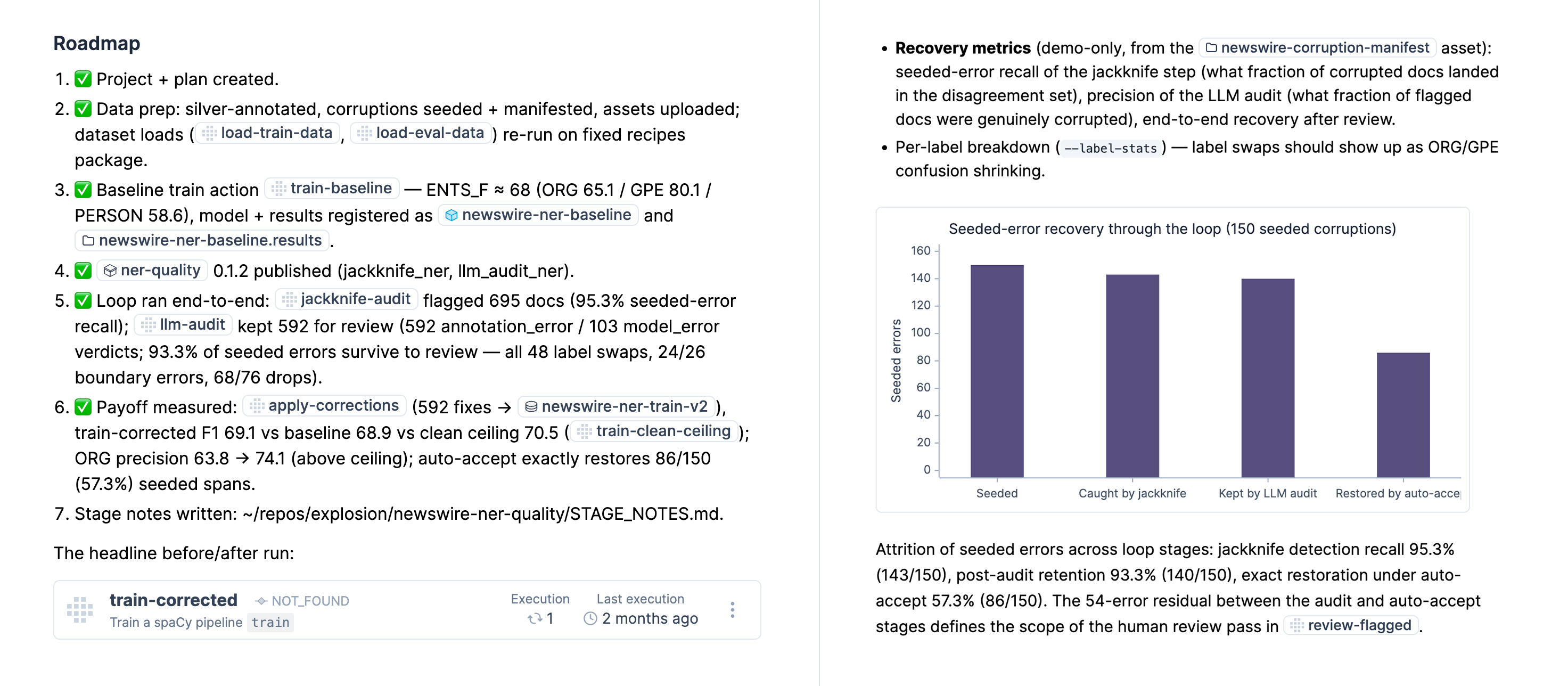
Example: Project plan details with cross-reference links and visualizations

Data annotation

This module helps you convert your business problem and project plans into the right NLP components, develop the best matching label schemes that are easy to annotate and learn from, and set up automated data annotation workflows. It will start the Prodigy annotation tool if needed and provide you with the setup to scale up your data labelling process by creating tasks in the platform and setting up agents to auto-label data for you. You can also ask it to create annotation guidelines for humans and agents.

The data annotation module also incorporates many best practices for creating generalizable categories and implementing the most efficient human-in-the-loop and model-assisted data development strategies, like our guide for optimizing annotation workflows. This information is also available in the knowledge base that you can access via the ellf-ask module.
✳︎Claude Code: Setting up annotation on the cluster
› /ellf-annotate

I want to start annotating my customer support emails for intent classification. The labels are REFUND, SHIPPING, TECHNICAL, and BILLING. My data is in the cluster at data/support-emails.

⏺︎

Your label scheme, data source, and annotation objective all look good. Since this is a text classification task starting from scratch, I’ll use the built-in textcat.manual recipe with your four labels. Let me preview the setup first.

✔ Preview server running at http://localhost:8080
⏺︎

The form and annotation interface look correct — four labels rendered as exclusive options. I’ll go ahead and create the task on your cluster.

✔ Created task “Support Email Classification” (textcat.manual)✔ Task started on cluster
⏺︎

Your annotation task is running. You can open it at https://app.ellf.ai/project/019d8cd3-3cab-7543-b1d5-38ebe996c8a9/task/019d8cd3-5051-7313-a930-7319c0237464/ or assign annotators and agents to start labelling.

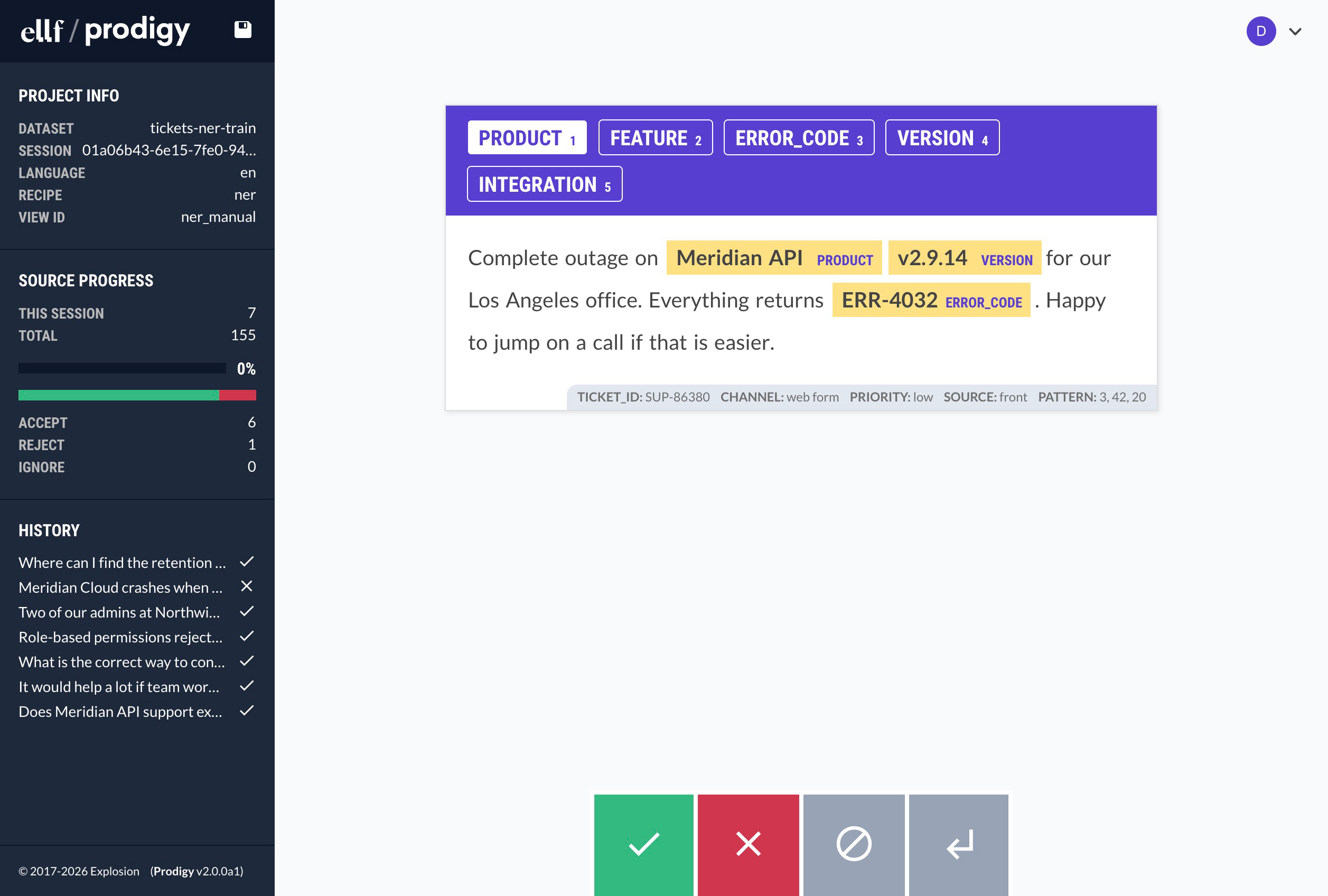
Example: The Prodigy annotation app running on your cluster

Prodigy recipe builder

This module makes coding assistants proficient at using the Prodigy annotation tool and implementing custom recipes and interfaces for specific use cases. Ellf will use it if a custom annotation workflow is required for data collection in your project, e.g. during the data annotation step. You can also call this module directly if you already have an annotation goal in mind and need help implementing the workflow and annotation interface for it. For more details, also see the page on Ellf for Prodigy users.

The recipe builder can implement recipes for both the standalone workflow that runs Prodigy locally, as well as Ellf tasks that run on your cluster and let you assign human annotators and autonomous annotation agents in the platform. Compared to the data annotation module, which focuses on annotation strategy, this module specifically targets the Python recipe implementation.

✳︎Claude Code: Building a custom annotation recipe
› /ellf-prodigy

I need a recipe for annotating product labels in images. The images are in Japanese and annotators need to see an English translation.

⏺︎

This will need a custom recipe with two parts:

  1. Image display with on-demand translation — call a translation API when loading each image and show the result alongside it
  2. Label interface — classification UI for the product categories

Let me start with the image loader and translation component. I’ll use a blocks layout that renders the image on top and the translated text below. Sound good?

✳︎Claude Code: Building an interactive annotation UI with JavaScript
› /ellf-prodigy

I need a custom entity linking recipe where the user does NER annotation and then each entity is searched in the knowledge base, and the user is able to select the correct one from a dropdown. Another button next to the entity should display expanded definitions of the entities.

⏺︎

I’ll help you build this NEL (Named Entity Linking) annotation recipe. Let me explain the plan before building:

Why this needs custom UI, not a built-in: NEL (entity linking) is a two-stage task where stage 2’s options depend on stage 1’s output. The KB candidates can’t be precomputed because the entities don’t exist until the annotator corrects them. Prodigy blocks are static per-task, so the only way to get “annotate → search → pick” in one screen is the event_hooks ↔ window.prodigy.event() round-trip — the JS reads the live spans and asks the Python backend to search the KB on demand.

The components dict passes straight through the Ellf SDK to Prodigy, so event_hooks, config.javascript, and html_template work identically on the cluster as in standalone Prodigy.

Definitions returned inline with candidates means the “Definitions” button is a pure client-side toggle (no extra server round-trip), which keeps the UI snappy.


Pattern generation

This module helps you determine which information to extract requires machine learning solutions, and which parts can be reliably extracted using rule-based logic like match patterns, regular expressions or other heuristics for faster and more predictable results. It can also automate the creation of those match patterns and iteratively refine them with alternating precision and recall passes, while asking you for interactive feedback on the results. At the end of the process, the module can provide you with the code or script needed to apply the generated patterns or integrate them into your existing NLP pipeline to combine models with rules.

✳︎Claude Code: Generating patterns for invoice extraction
› /ellf-patterns

I need to extract invoice numbers and amounts from procurement documents. Invoice numbers look like INV-2024-00123 and amounts are in USD.

⏺︎

Both of these are great candidates for patterns — they have predictable surface forms. Let me generate an initial set.

⏺︎

INVOICE_NUMBER — 48 matches across 50 documents, e.g.:

  • “Please reference INV-2024-00123 for payment”
  • “Submitted under INV-2023-45678 on March 3”

AMOUNT — 62 matches, e.g.:

  • “Total due: $14,250.00”
  • “Line item subtotal $899.99”

Precision looks high. Want me to run a recall pass to catch edge cases, or export these patterns as-is?


Model training

This module uses your data to train the best possible small, fast and private model components, e.g. a spaCy pipeline consisting of the previously developed components. Based on your requirements and project plan, it will automatically pick a suitable configuration, embeddings and hyperparameters. It will also log the training results for further analysis and export a loadable model and code to use it in your application. To perform and manage training in the cloud, the module can also set up actions that run on your cluster and use GPU resources if available.

Once your training experiments are running, the module can analyze your training logs and results, interpret and explain them for you, and recommend strategies for next steps and further improvements.

✳︎Claude Code: Detecting overfitting during training
› /ellf-train

My NER model for extracting company names and job titles from resumes has been training for a while. How’s it looking?

⚠ Overfitting detected — dev score declining while training loss continues to decrease (sustained over last 4 evaluation steps)
⏺︎

Your best model was saved at step 1,600 with 0.79 F1 (COMPANY 0.85, JOB_TITLE 0.71). After that, training loss keeps dropping but dev scores are going down — the model is memorizing your training data. JOB_TITLE is the weaker label. Checking your data: you have 312 COMPANY examples but only 87 for JOB_TITLE. That’s likely not enough for reliable generalization. I’d recommend:

  1. Annotate more JOB_TITLE examples — target at least 150
  2. Increase dropout from 0.1 to 0.3 in the next run
  3. Use model-best from this run as your current baseline

Want me to set up an annotation task to collect more JOB_TITLE examples?


Question answering

This module connects to Ellf’s extensive knowledge base consisting of documentation, code, project examples and advice for different use cases and domains, as well as development best practices and our distilled expertise from 10+ years of solving real-world NLP problems in industry. The knowledge base also includes documentation and examples of Ellf itself, as well as our other tools, spaCy and Prodigy, and their related ecosystems.

✳︎Claude Code: Example
› /ellf-ask

I’m developing a system to extract product names from internal company reports. I have about 2000 annotated training examples. How many evaluation examples do I need to report meaningful accuracy?

⏺︎

To report meaningful accuracy for your system extracting product names from internal company reports, a good rule of thumb is to have at least ten evaluation samples per significant digit of your accuracy metric. For instance, if you want to differentiate between 90% and 91% accuracy, you would need at least 1,000 evaluation examples annotated.

Given that you have 2,000 annotated training examples, aiming for a similar quantity of evaluation examples, around 200 to 400 examples, is typically recommended for initial assessments.


Human support

If you ever feel stuck or need human feedback on your project plans and workflow, you can use this module to send us your logs and have them reviewed by one of our NLP experts. Alternatively, you can also export your conversation log to a file and email it to us at support@ellf.ai.

✳︎Claude Code: Submitting a support request
› /ellf-support

The model’s accuracy isn’t improving with more data, so I’m considering changing the label scheme. Is this a good approach?

⏺︎Should the support request include your full session transcript, or a summary only?
› Full transcript
⏺︎

Support request sent successfully.

  • Reference ID: a7cf3184865e4f05a8bf269ad34c767a
  • Session transcript: attached
  • Debug log: not found (not attached)

The Ellf team will receive your question about whether changing the label scheme is the right approach for the accuracy plateau. You’ll get a copy via email.

Support requests are reviewed by our team and you’ll typically receive a response within a few business day. The module will always ask for your permission before sharing your conversation logs.


Monitoring and observability

This module monitors and diagnoses running jobs from your coding environment. It can check on tasks, actions, agents and services running on your cluster, local training runs, standalone Prodigy servers, and overall cluster health. Instead of dumping raw logs into your conversation, the module produces compact structured summaries with actionable alerts. It covers several monitoring surfaces:

  • Training jobs: Tracks loss, dev scores and best checkpoint, and detects problems like overfitting, score plateaus, loss spikes and NaN loss.
  • Annotation tasks: Reports task state, dataset growth signals and annotator or agent activity to help you spot stalled or misconfigured annotation workflows.
  • Agents: Checks agent state, recent errors and whether the agent is producing work or appears blocked.
  • Cluster health: Runs connectivity, cluster-side and node capacity checks to surface degraded state or resource pressure.
✳︎Claude Code: Checking on a training action
› /ellf-monitor How’s the NER training going?
⏺︎
Jobner-product-names-v2 (action)
Staterunning — step 800
Best score0.81 (ents_f) at step 720
Train loss0.52 (stable)
AlertsNone

Training looks healthy. The score has been improving steadily and there are no signs of overfitting or loss instability.

✳︎Claude Code: Checking on an annotation task
› /ellf-monitor How is the company reports annotation task going?
⏺︎

Task: Company Reports Annotation 2026


FieldValue
Statusready
Recipener (Named Entity Recognition)
ProjectCompany Reports Analysis
LabelsPERSON, ORG, DATE
Datasetcompany-reports-ner (kind: ner)
InputReports 2026 Corpus
Created2026-04-14 by Alex
Annotate URLhttps://app.ellf.ai/annotate/019d8cd3-5051-7313-a930-7319c0237464

Status: Task is provisioned and ready to annotate — no errors, no related actions yet. No intervention needed. Next step is to open the annotate URL and start collecting examples, or launch an action to train once the dataset has content.

› What’s the status of the collected annotations?
⏺︎

Collected Annotations — Company Reports Annotation 2026


MetricValue
Total examples232
Answer breakdown230 accept / 0 reject / 2 ignore
Examples with user spans168 (64 accepted with no spans)
User span labelsPERSON: 89, ORG: 45, DATE: 18
Distinct Annotators3 (Alex, Charlie, Kim)
✳︎Claude Code: Checking on the cluster status
› /ellf-monitor What’s the status of my cluster?
⏺︎

Overall: Healthy ✓

CheckResult
Cluster APIResponding on yourorg.ellf.run
K8s APIAccessible, cluster Ready

Nodes (1):


NodeStatusCPUMemoryGPUPods
gke-cluster-0469e73e-9z75Ready1930m~6.0 GiB-5

No degraded state, no failed checks. No intervention needed.


Platform operations

This module makes your coding assistant proficient at navigating the web platform and ellf command-line interface so it’s able to create and manage tasks, actions, agents and services, interact with the cluster, navigate to the right pages and resources, and perform any other actions for you. It essentially makes Ellf good at using itself to its full potential.

Ellf will generally ask you for additional confirmation before creating, running or deleting things for you, and will execute everything under your user account.

✳︎Claude Code: Performing actions via the CLI
› Start the Company Reports annotation task and summarize the logs.
⏺︎

✔ Task started. Here’s a summary of the logs:

  • Recipe: ner (Named Entity Recognition) with view ner_manual
  • Labels: PERSON, ORG, DATE
  • Input: Loaded asset “Reports Raw (train)” via txt loader
  • Dataset: Created reports-ner-train in PostgreSQL
  • Server: Prodigy is running on port 80, health check passing

You can open it for annotation at:
https://app.ellf.ai/annotate/7a2c49e1-83bf-4d12-ae95-f1c620d8b537

Read next
Platform

from the makers of spaCy and Prodigy

Navigation

  • Home
  • Documentation

Platform

  • Pricing
  • Free Trial

Use Cases

  • Prodigy
  • Universities

Resources

  • Case Studies
  • Blog
LoginTerms & ConditionsPrivacy PolicyImprint© 2026 Explosion