Ellf: Your virtual NLP engineer
Ellf gives your coding assistant like Claude Code superpowers for solving AI and Natural Language Processing (NLP) problems and a platform to execute data-centric projects, automated annotation, evaluation and more. It includes skills and knowledge for all parts of the NLP development lifecycle, including all our best practices from over 10 years of solving real-world problems in industry.
To keep your data 100% under your control, Ellf lets you plug in a powerful and fully data-private cluster that runs locally or in the cloud and makes it easy to execute annotation tasks, auto-annotation agents, training experiments and more, and collaborate on development with your team.
Ellf is currently in early access
Features and APIs may change as we iterate, so make sure to keep your ellf CLI and skills up to date. We’re also open to partnerships where we help you and your team with a custom NLP project and collaborate via Ellf – just get in touch!
First steps
Install the Ellf client
Download the CLI and connect Ellf to your coding assistant like Claude Code.
Set up your cluster
Launch your private data processing cluster locally or in the cloud.
Explore the platform
Get started and set up your first projects, tasks, actions, agents and services.
Once you’ve installed Ellf and connected it to your coding assistant, you can start by describing your project and asking it questions on strategy and next steps. If you already know what you want to do, you can also call the individual modules directly – for example, the ellf-project command starts the project planning module and ellf-annotate helps you design data annotation tasks.
› /ellf-project We need to extract products and features from support tickets. We started with an LLM API but
it’s slow and expensive, and our data needs to stay private. How can we train our own model?
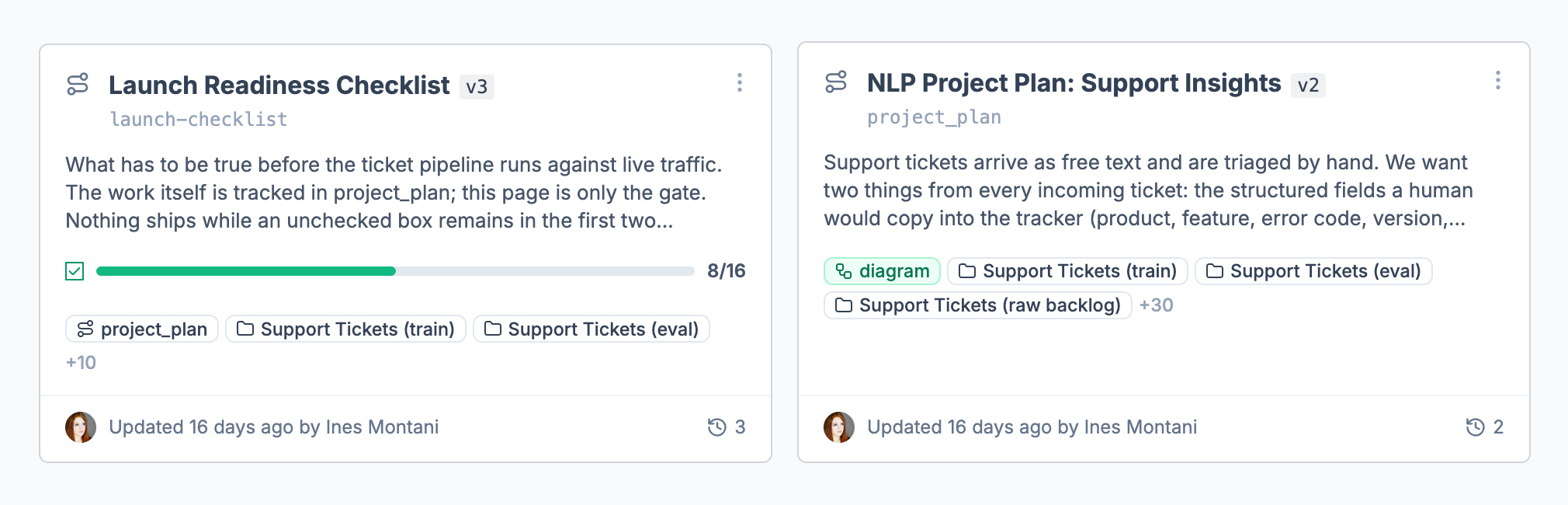
⏺︎Let me analyze your requirements and put together a project plan for you.To keep track of your project, Ellf will create detailed project plans. These are Markdown documents that are continuously updated and outline the end-to-end development plan, including step-by-step workflows and higher-level strategic goals.
NLP development typically involves running many different things: data processing, annotation, training experiments, evaluation and more, often iteratively and in parallel. To make this easier, Ellf can automatically start and monitor these processes and run them in a data-private cluster, either locally or on your own cloud account. This means that no data ever has to leave your servers.
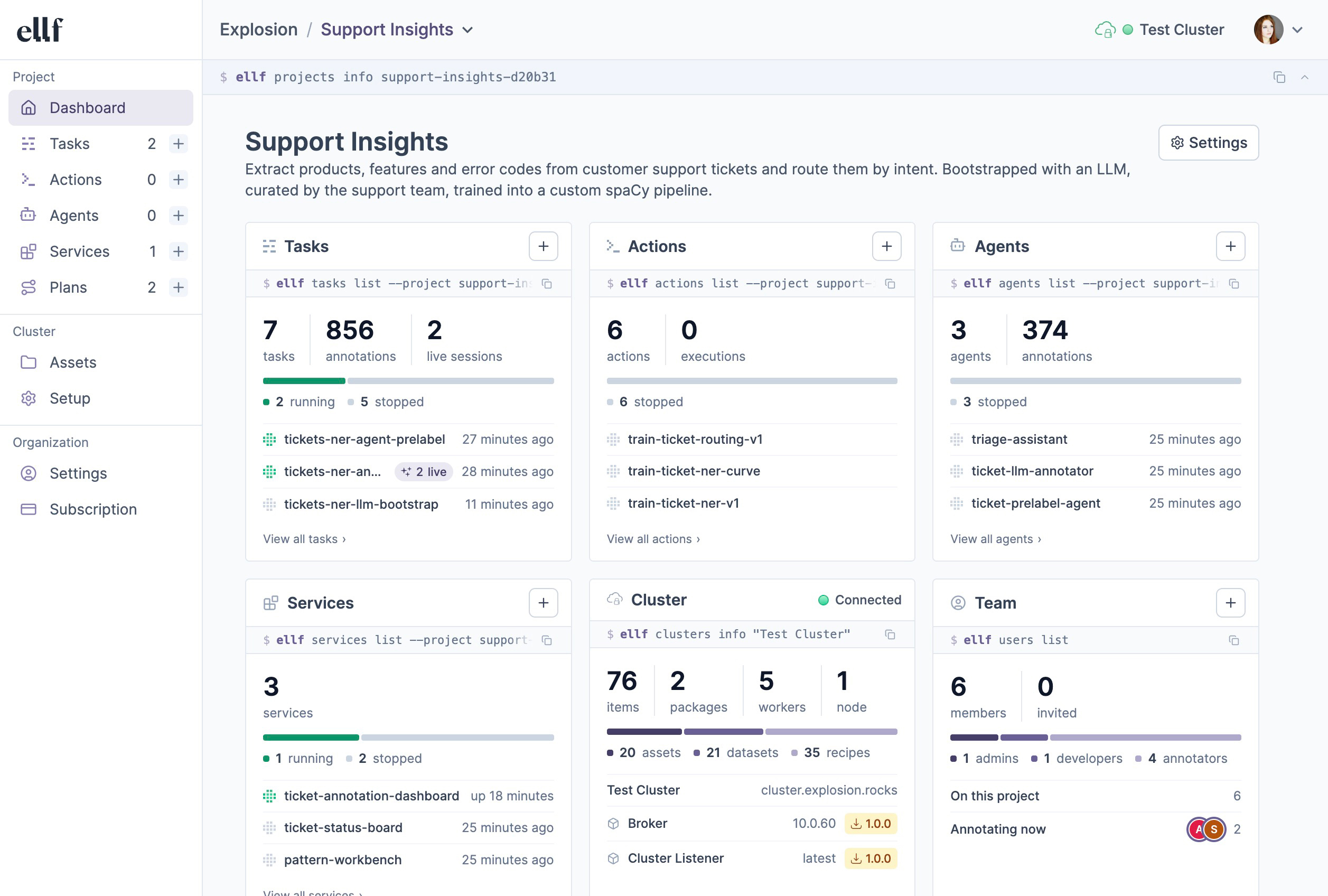
The platform lets you view your tasks, actions, agents and services, as well as data assets on your cluster, and collaborate on them with your team. You can interact with Ellf and manage resources via the ellf command-line interface or visually in the app. The web UI also includes a command bar at the top that shows the CLI command corresponding to the current page or view, making it easy to switch between using the app and CLI. Your local coding assistant also uses the CLI to interact with Ellf.
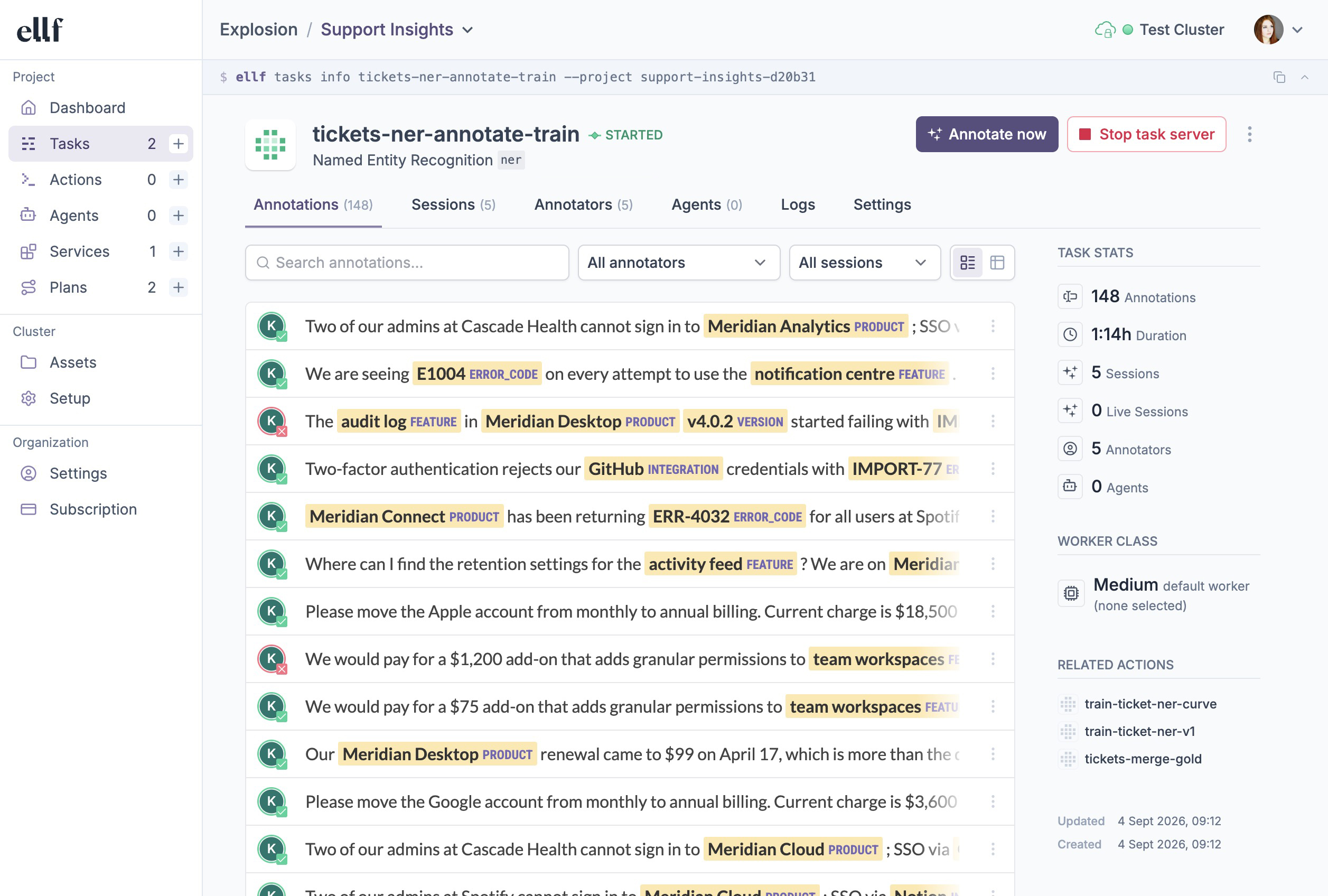
For data annotation, Ellf ships with our popular and efficient annotation tool Prodigy, a range of built-in recipes for common tasks, as well as annotation agents to automate data development for you. Ellf can also help you select the right NLP components for your business problem and develop the label scheme before you scale up development.
Use cases
Use Ellf to get started
If you’ve connected Ellf to your coding assistant, it will know what to do – so you can start by describing your project and requirements, and have Ellf suggest the next steps.
Architecture
To keep your data private and allow flexibly scripting the application workflows in Python, Ellf implements a hybrid dual-cloud architecture, consisting of a web application and servers hosted by us, and a data processing cluster hosted by you locally or on your own cloud account and entirely under your control, similar to self-hosted runners in a CI system. The cluster stores and provides all code and data, which is executed and served directly from there.
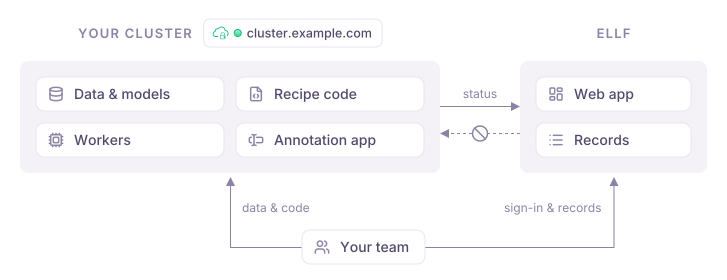
Ellf generally stores records of data and other objects, as well as user and organization details, while your cluster stores the actual data and runs the code. Whenever data is shown or served in the web application or CLI, it comes straight from your cluster and doesn’t ever pass through servers hosted by us.
| Your cluster | Ellf |
|---|---|
| Data assets, model files, code and secrets | Records of names, IDs and paths |
| Recipe code and workers running tasks, actions, agents and services | Records of tasks, actions, agents and services, and their recipe arguments |
| Prodigy database with datasets and examples | Records of dataset names and IDs |
| Web server with Prodigy annotation app | Statistics on user accounts accessing annotation app and counts |
| References to project IDs in tasks, actions, agents and services | Metadata of created projects |
| References to user IDs in datasets | Organization and user accounts |
| Project plans after migration | Project plans before migration |
Read next
Human support
If you ever feel stuck or need human feedback, you can use the support module to send us your logs and have them reviewed by one of our NLP experts. Alternatively, you can also export your conversation log to a file and email it to us at support@ellf.ai.
› /ellf-support The model’s accuracy isn’t improving with more data, so I’m considering changing the label
scheme. Is this a good approach?
⏺︎Should the support request include your full session transcript, or a summary only?› Full transcript⏺︎Support request sent successfully.
- Reference ID:
a7cf3184865e4f05a8bf269ad34c767a
- Session transcript: attached
- Debug log: not found (not attached)
The Ellf team will receive your question about whether changing the label scheme is the right approach for the accuracy plateau. You’ll get a copy via email.